USB Company

10 Useful Things You can do with a Flash Drive

robot-usb-own
If you’ve been using a USB flash drive for a while, then you already know that it’s terrific for taking your important files with you so you always have access to them. But there are plenty of other things you can do with a USB flash drive. Here are our favourites:

1. Boot up from your flash drive.
If you’re using Windows or Linux, you can actually boot the operating system from the drive. It’s not the easiest thing to do, but there are some guides to follow out on the Internet if you’re savvy enough to try.

2.Run applications remotely.
You can put OpenOffice on your USB flash drive and use its word processor, spreadsheet, presentation tool, drawing software and database to access your files, even if the computer you’re using doesn’t have Microsoft Office or another office suite installed on it. You can get other applications too from PortableApps.com, such as games or an audio or video player.

3.Reset passwords anywhere.
If you forget your password to your Windows system user account, you can use your USB flash drive as a reset disk to quickly get back in. There are tutorials online on how to do it – just do a google.com search for “Create a Vista” password and you should find instructions for creating a USB flash drive password reset disk.

4. Improve performance.
If your hard drive is getting a little full, you can use Windows Vista’s ReadyBoost technology to use the space on your USB flash drive as an additional memory cache. Because the flash drive doesn’t have any moving parts, flash memory is much more responsive and can really improve performance if your system is starved for memory. Just follow the prompts when you insert your USB flash drive to configure it for use with ReadyBoost.

5.Connect wirelessly.
If you’re working in a wireless world using the wireless tools in either Windows XP or Vista, you can save all your network configuration information to the USB flash drive. When you use another computer or any Windows Connect Now (WCN) device, you can quickly connect using the settings on the drive.

6.Protect your data.
If you’re worried about your data falling into the wrong hands, you can use Rohos Mini Drive to safeguard your information. This slick little tool lets you create a secret partition on the drive that you can password protect. Any documents in the partition are safe from prying eyes.

7. Enjoy your music anywhere.
Don’t have an Mp3 player but want to enjoy some tunes? Load your music onto your USB flash drive and use Windows Media Player to access the files. You can also import the music straight into iTunes if you have it installed. Not only do you have your favourite music with you at all times, but you don’t have to worry about the batteries going dead on your Mp3 player.

8. Run your online empire from a flash drive.
With a product like Server2Go, you can run your own website remotely from a USB flash drive. Server2Go supports most of the common web languages, such as Apache, PHP and MySQL. Best of all, it’s free. This is a great feature if you’re a web developer. You can load an entire demo site onto the drive for your meeting with a client.

9.Use like a key on your PC.
A program called Predator turns your USB flash drive into a key that locks and unlocks your computer. When it’s inserted into your USB port, everything works fine. When you remove it, the screen becomes dark and your keyboard and mouse won’t work. This is terrific if you’re working on sensitive projects and want to go get a cup of coffee or a bite to eat without shutting the computer down. When you return, simply insert the USB flash drive and you’re up and running again.

10. Transporting your files.
We saved the most obvious use for last. If you’re running XP, you can use the Microsoft USB Flash Drive Manager to manage file transfers. Once it’s installed, you can move files back and forth easily. If you’re on a Mac, you can simply drag and drop files onto the USB flash drive, which appears as a hard drive icon on your desktop.

And there you have it! Ten really great ideas for improving your productivity, save you time and even money (you don’t need to buy an MP3 player for starters) and get more use out of your USB flash drives, which are inexpensive and so easy to use.

Promotional USB Drives are People too.

standard-packaging

If you read the headline then you probably did a double take. No, you’re not looking at a keying error. Some of the newest, most innovative USB flash drives are beginning to take on new persona, from a friendly doctor to a savvy businessman.

Looking a bit like a Lego creation, these the cute little characters not only offer additional storage in a super small package, but further your branding by creating a memorable promotional product that keeps you top of mind with your clients.

The USB People drives range in size from 512 MB all the way up to 8 gigs and are fully USB 2.0 compliant. They work great on any computer system, including all the various incarnations of Windows and Mac.

If you’re in the medical profession or in business, you can order stock versions of the USB People and have your logo or message imprinted on them. Stock versions include a businessperson, doctor, nurse and dentist.

If you’re looking for something custom, that’s entirely possible too. Imagine USB People flash drives that are sports teams, construction workers, delivery people or any number of other highly recognisable characters. You can even mix and match them, creating entire teams of USB People, ready to provide your customers and employees with handy, portable and virtually indestructible storage.

One of the great things about USB People drives is that they are highly collectible and highly prized by those lucky enough to receive one. Don’t be too surprised if you find these smart promotional products gracing the offices, cubicles and work areas of your customers. They can provide you with the competitive advantage you need to make your brand memorable in a very crowded marketplace.

USB People is just one of the many new innovations in USB flash drive designs and it is certainly one of the most creative. Depending on the model you select, users either remove the cover on the feet or the head to expose the USB 2.0 port, which can be docked right into your computer, a keyboard with USB connectivity or a USB hub.

If you think the engineering of these drives isn’t top notch, think again. Inside these USB People drives is the same high quality components found in any USB flash drive today. They will continue to operate in virtually any climate or condition. There’s even an LED light to let you know when the drive is transferring data and the drives stand up on their own two feet, literally.

One of the great things about these USB People flash drives is they can show off your company’s sense of humour and sense of fun. This is perfect for medical practitioners and law firms, where the actual work is very serious. The drives show you have a lighter side that goes beyond the visits to the office.

How can you use them to drive business or promote your brand? For example, you can use the nurse version as a give-away during Nurses Appreciation Week or use the doctors to promote a new health program or service. The possibilities are virtually limitless.

At 7.5cm tall, they fit in just about any pocket yet aren’t so small that you could possibly misplace them. After all, compared to a bland, basic USB flash drive, a small doctor, nurse or other professional is pretty hard to misplace on a desk, purse or counter.

One of the great things is that even a custom design has a relatively low minimum order. Depending on the company, you can order as few as 250 pieces in order to get a custom design in your choice of colours and professions. For stock designs, the quantity is even lower, often just 50 units.

Add some new staff to your workforce in the guise of USB People and watch your customers clamour to collect their favourites with one of the most innovative promotional product ideas to come along in some time.

Recruiting? Go Gumtree, avoid the greedy Monster

Gumtree

USB Company is expanding and in the search for the new team member we had a a couple of options. Previously we had used gumtree for recruiting and we have been very impressed with the amount of applicants we had received. Now this time we decided to have a look at Monster which is a pure job listing site and even with the high price tag of £125 for 2 weeks listing we decided there must be a reason why they are so expensive. So we posted and paid by credit card and then waited and waited and waited. After 7 days nothing had happened, not a single email or phone call, we called the Monster and asked if our listing was up and they confirmed it was listed. So what does it mean, well for us it was clear its a waste of money. After 14 days we had 2 applicants from Monster adding up to £62.5 per applicant.

In comparison 2x£25 ads on Gumtree.com gave us over 70 applicants to choose from, admittedly the quality of the applicants varied a lot but still the difference in response was surprising.

So you are hereby warned don’t waste your hard earned money on the greedy monster go gumtree instead!

Increasing event revenue with USB flash drive memories

Photographer

If you’re an event organiser, chances are good that your hard work has paid off with a seminar, meeting, reunion, wedding or trade show that attendees will remember for a long time.
As you know these events offer everyone a great time to connect or reconnect, make new friends, find new customers, network and cement relationships that may last years, if not a lifetime.

To make these memories last, think about using USB flash drives, not only as a type of digital scrapbook, but as a chance to further your branding as an event organiser or sponsor.
Here’s how to do it. As the event unfolds, capture all the key moments digitally. This can include photos, video, music, keynote presentations or even digital versions of printed materials, such as menus, invitations, speeches or workbooks.

Once the event is finished, combine all these materials into an edited form of the event. You can create slideshows, music videos, create links to websites for additional resources or allow recipients to print out documents or photos.
When it’s completed, have the files preloaded onto a promotional USB flash drive. If you don’t know how to do this, ask the company handling your flash drive order. They will help you put your brand to work for you, not only by adding your logo to the outside of the drive case, but pre loading the files onto each drive.

Now you have something that you can either give away or sell to recipients. The latter is a smart idea, since you cover the cost of the drive plus a mark-up that will help you generate additional revenue. It is a great value-added souvenir that not only lets the recipient re-experience the event itself, but also can be used over and over again to backup or store digital files at work or home.

This keeps your brand front and centre as the USB flash drive owner uses your keepsake in their everyday life. And, it’s not only a lasting reminder of the event, but of your organisation.

End of AutoRun a boost for the promotional USB industry

13-windowsautorun

Preloading marketing messages onto a USB flash drive that’s being given away as a promotional gift has been standard practice for many years. Unfortunately, the AutoRun feature found in Windows causes the message to load and run every time the drive is inserted.

That’s pretty annoying and has caused marketers to second guess their desire to add promotional messaging to their promo drives.

Thankfully, Microsoft is about to sound the death knell of the AutoRun feature, primarily because malicious programmers have been using it to spread malware and viruses. To stop this practice, Window 7 will stop any AutoRun tasks, so users won’t be tricked into launching apps that could have infectious code.

That means that your USB flash drive recipients won’t have your message load every time they insert the USB drive into their computers and flash drives will be less of a threat for system administrators. Instead, the drive will simply show up as removable drive, without running first.

This is great news for everyone involved. First, recipients will be more likely to use promotional USB flash drives since they don’t have to worry about their computers being tricked into uploading malicious code automatically. Second, your drive will become an invaluable part of the recipient’s daily computer use, since it is such a convenient way to store and share files. Of course we can still pre load your marketing message which can be opened by the receiver as normal, this data can either be erasable or locked.

For those early adopters, the new feature is already available in the RC build of Windows 7. Microsoft is planning to make the chance available on Windows Vista and Windows XP as well, so all of their customers can benefit from the new capabilities that make USB flash drives more useful than ever.

Marketing a “snap” for photographers with USB flash drive

11-photo-blog

Even if you’re the most talented photographer in the world, you know that it is always an uphill battle to get your name out there. Sure, you get repeat business and even a referral now and again. That’s the lifeblood of most photographers.

But what if you could find a way to make every single contact with a prospect a chance to market your business?
A USB flash drive is the perfect tool. With it, you can get your name out in front of everyone you come across and here’s how to do it.
Capturing an event is an art. Sure, anyone can take a picture. But few have the knowledge, expertise and artistry to create a memory that communicates a moment in time. Whether you shoot weddings, sports events, corporate gigs, family reunions or high school portraits, these moments are meant to be shared.

That’s where the marketing kicks in. Imagine being able to share these photos with everyone that wants them, all in a neat little package that lets others enjoy your photography while leading to new opportunities for work.
By using a USB flash drive, you can put your images to work for you. First, you get promotional drives that have your logo on it, along with your contact information, whether it’s a web address, phone number, email address – whatever.

Then you load all the finished, edited images onto the drive. This can then be given away to attendees or sold as a keepsake of the day. This is particularly effective at reunions, corporate parties, awards banquets, graduations and weddings. Just be sure that you cover this option in your discussions with the client so they can give you their permission to use the photos in your marketing.

Of course, a bunch of photos on a flash drive isn’t exactly a great sales tool. You’ll want to dress it up some. If your client will let you include a folder of photos others can print out and use (say, the wedding party gets a full set of the photos the bride and groom usually get), that’s cool. There’s plenty of space on a promotional USB flash drive for the photos.
But you’ll also want to include a marketing message. This is what appears when the recipient first opens the drive. After loading, a slide show appears with all the photos. At the beginning and end is your contact information, so they will think of you when they plan their next event and need to hire a photographer.

Depending on your skill level you can also add a nice sound track, have the photos dissolve into one another, integrate a link to your website or allow recipients to order a high quality copy of the image for proper display (obviously, you want the images on the flash drive to be lower quality, since your photography is how you make money).

This is not only a great marketing tool, but can create additional revenue streams. Lots of people will want a nice print of the image on archival paper or matte or linen paper stock. Being able to order from the flash drive is a great sales tool.

The great thing about the USB flash drive is that it offers far more storage space than a CD, is extremely easy to ship since it is so small, and the recipient can use it on their end to transfer data or store important files. This makes it a win-win for both you and your clients.

USB flash drives and Flight 1549

flight1549

By now, just about everyone has heard the heroic tales of Captain “Sully” Sullenberger as he ditched his Airbus 320 into the Hudson River after striking a flock of birds.

But what you may not know is that all of the passengers have been getting their items back, including the items from their luggage as well as anything they had at their seat – purses, computers, books, etc.
This came as a surprise to some of the passengers, but the most surprised may have been Vicki Barnhardt, who received her package without warning a couple weeks ago.

According to press reports, Vicki was very happy to see her items, especially since she had given them up for lost, having been submerged for several days in the frigid waters of the Hudson River. Even her favorite pair of running shoes looked brand new, thanks to the efforts of Douglass Personal Effects Administrators, which was charged with the awesome task of returning all the belongings.

So what does this have to do with USB flash drives?

In the same box as Vicki’s shoes were the four flash drives she had thought were lost in the crash. Not only did the drives look like new, but all of the data was still on them and was retrieved. Those passengers with ordinary hard drives in their computers weren’t so lucky as the water took its toll on the electronics. But the USB flash drives came through the incident with flying colors, allowing Vicki to access everything she thought she had lost.
This is perhaps the best testament about the durability of USB flash drives. If they can survive an emergency landing in the ice cold Hudson in the dead of winter, they will certainly survive anything you can dish out at them during a normal work day.

I just thought there is no way I am going to retrieve any of this data but I can get every bit of it. That’s amazing,” said Barnhardt.
It certainly is, Vicki. It certainly is.

Reformatting Your USB Flash Drive

Businesswoman holding portable storage pen device in notebook.
While flash drives can be a real godsend for storing and exchanging data, videos, photos and audio, eventually, they get a little messy. Dragging and dropping files onto the drive can create an organizational nightmare, one where it becomes difficult, if not impossible, to find the files you need when you need them.

Deleting the files will work well up to a point. But eventually, the drive will not be as efficient as it should be because little bits of data will still exist on the drive – remnants of your past activity.

Reformatting the drive is usually the best solution for restoring your drive to its full potential and here’s how to do it quickly and easily.

Before you do anything, back up the data onto another drive, just in case you left a critical file on it that you don’t have elsewhere. Better safe than forever sorry. A reformat permanently erases everything on the drive

Reformatting in Windows

Start by opening up “My Computer” or “Computer” in the “Start” menu and locate the drive that has the “removable disk” icon. Right click on the drive and select “Format”.

When you do, a dialog box will open up showing several options. You don’t need to fool with any off them unless you want to change the name of the volume. Leave the “quick format” option unchecked so the drive will reformat fully. Click the “Start” button and you’re good to go. The disk will be reformatted and everything will be wiped clean in just a minute or two.

Reformatting in Mac OSX

To reformat, open your “Disk Utility” program. It’s in the Utilities folder inside the Applications folder. The flash drive will show up as a white drive icon in the utility. Click on that icon and select “Erase” from the menu. If you want the drive to work well on a Windows machine as well as yours, choose the MS-DOS (Fat) option. Click the “Erase” button at the bottom and you’re all set.

Just remember that once you erase a drive, there’s no way to recover the data. And always be sure to double check that you’re about to reformat the flash drive and not another drive on your system. Nothing’s worse than reformatting the wrong drive and losing all that hard data.

The Technology Inside a Branded USB Stick

Usb disc

Reliability and portability have always plagued the portable storage industry. Floppy drives didn’t have much space on them, optical drives were ploddingly slow to burn data on, and CDs can easily be scratched and damaged in transit.

Then the flash drive was introduced. Small, portable and virtually indestructible, they could hold vast amounts of data that was easy to transfer from one computer to another through a single, universal connection.

But what exactly drives a flash drive to be the perfect storage solution?

Memory
First, flash drives and hard drives don’t share common DNA. Flash drives are actually byproducts of microprocessor technologies. Hard drives have moving parts that can cause be damaged. Flash drives are all electronic with no moving parts. Think of flash memory as the kind of memory that runs your computer or allows you to store thousands of photos on a digital camera. The storage space is all circuitry.

USB Connectivity
But the flash drive’s memory is only part of the secret. The other is the USB connection. Whether you have the newer USB 2.0 ports or the older USB 1.1 connections, the USB dock on a flash drive will work your computer. The 2.0 data exchange rate is faster, but both will get the job done. Nearly every computer made in the last 10 years has at least one USB port. One of the cool things about USB is that it powers itself, so you don’t need to bring along a separate power supply. Simply insert the flash drive into the port and voila! – the drive shows up on your desktop.

Putting it all together
Best of all, these two technologies combine to create the perfect portable storage and data exchange system. They are incredibly versatile and nearly indestructible. They are also relatively inexpensive, especially when compared to their predecessors. At one time a 100mb Zip disk would run you £10. Today, that same £10 will buy a flash drive with 4 gigs of memory, or 40 times the space, which is desperately needed for storage hogs such as photos, videos and music.

Certainly, flash drives aren’t going to be replaced any time soon. They are still being improved and there’s no replacement in sight. So you can rest assured that the data you have on your flash drive today can still be accessed years from now. Try that with a floppy disk these days.

Using USB Drives to Brand Your Business

usb-branding

One of the secrets to building a successful business is to create a strong relationship between you and your customer base. Good customer service, a solid product or service and attractive pricing are just a few of the many components of developing a sustainable brand.

But there are other pieces of the puzzle that need to be put into place. That includes smart marketing and advertising. Getting your name out in front of your customers is vital to your success in getting and keeping customers for your business. A customer must see your marketing message an average of nine times before they will remember it.
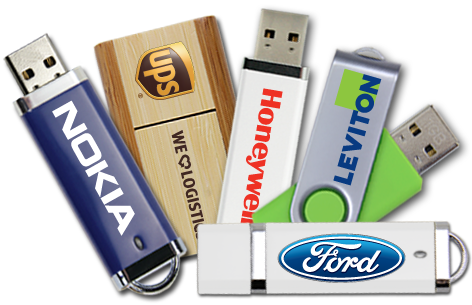
One of the least expensive ways to get your name out in front of current and prospective customers is the use of USB flash drives. Imprinted with your logo, they go everywhere your customer does.

Why are USB flash drives such a smart choice?

First, is its usefulness. Think of a USB flash drive as a portable version of your computer. Your customers can take the drive anywhere they go, sharing photos, files, videos and music from their office or home with their friends, family and associates.

Second, it sends a message that you value their business. A USB flash drive tells your customers that you care about them. It provides them with a secure, flexible and highly valued way for them to safely and securely store and share data.

Finally, a promotional USB flash drive gets your name out front of your customers and everyone they come into contact with. The drive can come with a lanyard, a keychain or even fit in their wallet, ready at a moment’s notice to be called into action. And as it is, your logo is there for all to see, imprinted right on the side of the drive.

A USB flash drive can also offer you one other thing no other promotional item can. You can preload your marketing information onto the drive, giving your customers access to your sales information, catalogs, pricing sheets and contact information.

We’d like to see a pen or a coffee mug do that!